YouTube to MP3 Converter
YouTube to MP3 Converter
Online
Convert YouTube videos and Shorts to high-bitrate MP3 audio online. Fast, secure audio extraction supporting 320kbps, 256kbps, 192kbps, and 128kbps quality.
Supports YouTube video links and Shorts with high-quality MP3 extraction.
High-Fidelity YouTube to MP3 Converter for Pure Audio Listening
link2video.site delivers an efficient, browser-based youtube to mp3 platform engineered to help you quickly convert youtube to mp3 without sacrificing acoustic fidelity. Whether you are extracting background study music, lecture archives, podcasts, audiobooks, or rare acoustic covers, our dedicated youtube audio downloader extracts the clean audio track and encodes it into universal MP3 format. If you need complete video files with visual imagery instead, try our dedicated YouTube video downloader, or visit our Facebook to MP3 converter for Facebook audio.
How to Convert YouTube to MP3 Online Step by Step
Using our youtube mp3 converter takes only three simple steps:
- Copy the YouTube Link: Open YouTube on your computer, tablet, or phone, find the video or Short, and copy the link from your browser URL bar or Share button.
- Paste into the Converter: Paste the copied URL into the converter field above and click the Convert button to analyze the audio stream.
- Select Audio Quality and Download: Choose your preferred bitrate (320kbps, 256kbps, 192kbps, or 128kbps) and click Convert MP3. When ready, the file downloads directly to your device.
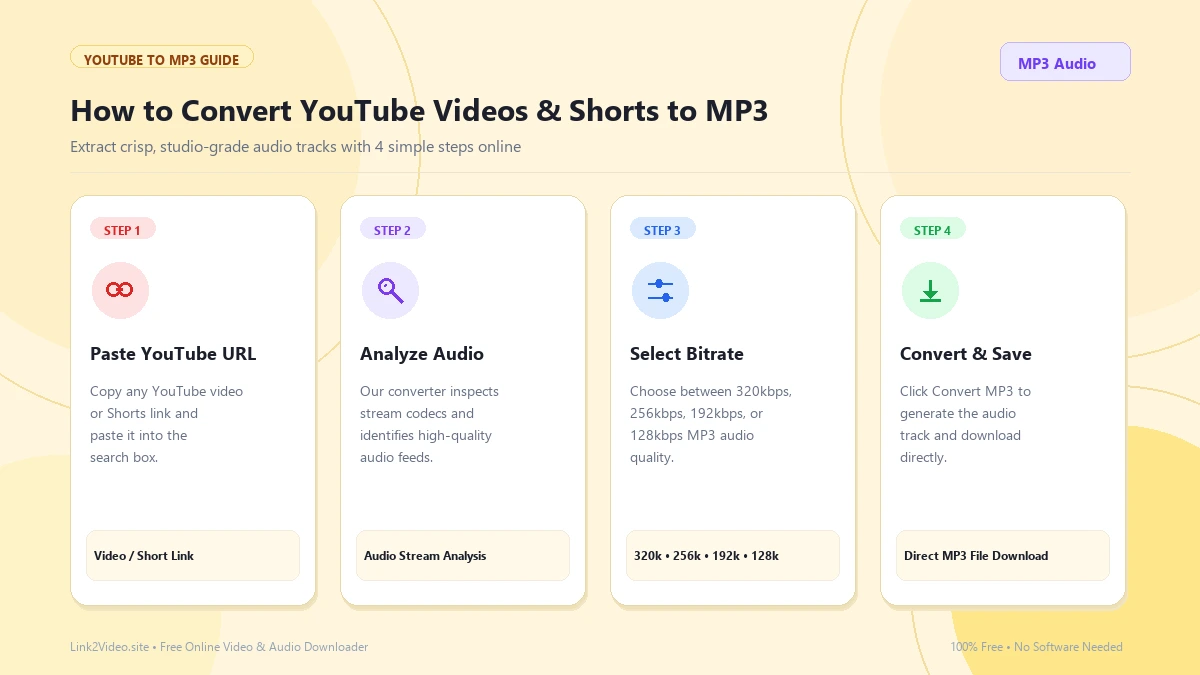
Three-step workflow to convert YouTube video links to high-bitrate MP3 files.
Understanding Audio Bitrates: 320kbps, 256kbps, 192kbps, and 128kbps
Different audio applications demand different balance points between acoustic fidelity and file storage footprint. When you download youtube mp3 files with Link2Video, you have four distinct quality settings:
320 kbps (Studio Fidelity)
Maximum available dynamic acoustic range and detail. Preserves rich sub-bass, intricate instrumental harmonics, and subtle highs for dedicated sound systems and studio monitors.
256 kbps (Premium Audio)
High-definition sound balance ideal for active music playlists and spoken podcasts, offering excellent auditory depth with manageable storage footprints.
192 kbps (Standard Audio)
The industry benchmark standard for online streaming and voice clarity, balancing fast download times with crystal-clear vocal reproduction.
128 kbps (Compact Audio)
Highly compressed lightweight audio files best suited for quick voice memos, study revision lectures, and mobile devices with limited remaining storage.
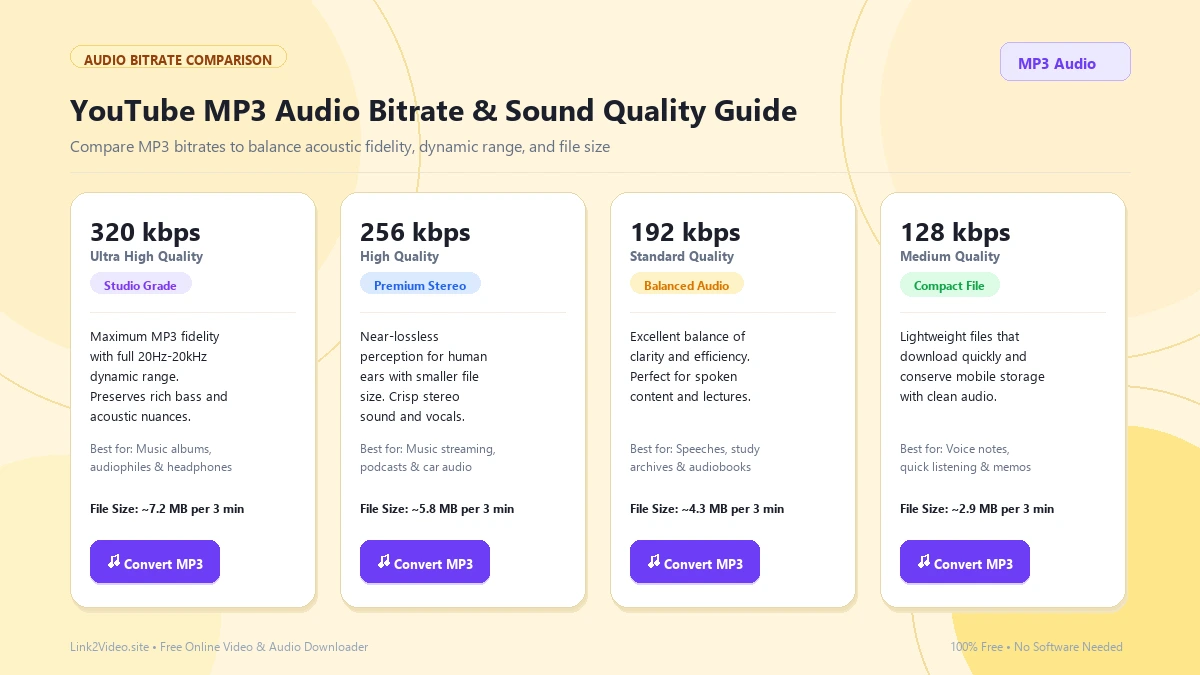
Select the ideal MP3 audio bitrate for your music library, podcast archive, or study notes.
Audio Extraction from YouTube Shorts & Vertical Clips
Trending audio and viral sound effects frequently appear in vertical short-form video. Our youtube audio downloader supports both full-length YouTube videos and vertical YouTube Shorts URLs. Simply copy the link from the Shorts interface, paste it into Link2Video, and extract the complete audio track in high-definition stereo without video overhead.
Video Download vs. Audio MP3 Extraction: Which Fits Your Needs?
Choosing between video and audio extraction depends on your usage:
- Choose MP3 Audio: When listening to audiobooks, speeches, music tracks, and podcast interviews while commuting, exercising, or relaxing without keeping your screen on. Saves substantial battery and device storage.
- Choose MP4 Video: When visual engagement, tutorial demonstrations, coding walk-throughs, or cinematography is required. In that case, use our YouTube video downloader.
Why Use Link2Video as Your Premier YouTube MP3 Downloader?
Universal MP3 Format
MP3 remains the world's most compatible audio standard, playing natively on iPhones, Android smartphones, Mac, Windows, Linux, and car stereos.
No App or Plugin Required
Experience seamless conversions directly in your browser without installing risky extensions, third-party software, or command-line scripts.
Private & Free Conversions
Enjoy unlimited download youtube mp3 access with zero subscription paywalls, no email registrations, and no hidden trial periods.
Cross-Device Compatibility for Desktop & Mobile
Whether you are browsing on an iPad, an Android smartphone, a MacBook, or a Windows desktop workstation, Link2Video is optimized for fast response times. Converted MP3 files stream directly into your browser's native download pipeline without opening disruptive media tabs or playing unexpectedly.
Responsible Use & Copyright Guidelines
Link2Video is designed strictly for personal offline backup, educational evaluation, fair-use research, and non-commercial archival purposes. Users should download or convert only audio tracks they own, created themselves, or have received explicit authorization from the intellectual property owner to use. Please respect artist copyrights and YouTube terms.
Frequently Asked Questions
Can I convert YouTube Shorts to MP3 audio?
Yes! Our youtube mp3 converter fully supports vertical Shorts links. Paste any valid Short URL to extract its complete audio track.
Is Link2Video YouTube to MP3 completely free?
Yes, Link2Video is 100% free with unlimited conversions, no hidden subscription costs, and no account registration requirements.
What audio bitrate gives the best sound quality?
We recommend selecting 320 kbps for the highest available fidelity, rich bass response, and crystal-clear acoustic resolution.
Can I download full MP4 video files instead?
Yes. If you need the complete visual video alongside audio, use our YouTube video downloader to save videos in up to 1080p and 4K quality.
Where are my converted MP3 audio files saved?
Converted MP3 files are automatically saved to your system's default Downloads directory on PC or Mac, or your browser's download manager on Android and iOS.